 ™
™

If you're still running your dealership off spreadsheets and sticky notes, you're not just disorganized—you're leaving money on the table. Finding the best crm for car dealers is about installing a central command center specifically designed for the unique chaos of automotive sales. It’s no longer a nice-to-have; it's a must-have for staying competitive.
Why a Specialized CRM Is a Necessity for Modern Dealerships

The game has changed. Today’s car buyer starts their journey online, long before they ever walk onto your lot. They've already researched models, compared pricing, and sifted through reviews. By the time they reach out, they’re not just browsing; they’re well-informed and expect you to keep up.
Trying to manage these savvy customers with a patchwork of outdated tools is a recipe for disaster. Leads fall through the cracks, follow-ups get missed, and sales are lost to competitors who provide a smoother experience. A CRM built for auto dealers is engineered to handle this modern sales cycle from the first click to the final handshake.
The Central Hub for Dealership Operations
Think of a good automotive CRM as the brain of your entire operation. It connects every text, email, phone call, and showroom visit into a single, coherent customer story. No more digging through different systems to figure out what’s going on. This is crucial for a true omnichannel customer service approach where every interaction feels connected.
This unified view gives your team the power to deliver great service at every turn:
- Initial Lead Capture: Funnel all inquiries from your website, third-party sites, and social media directly into one organized system.
- Automated Follow-Up: Set up automatic texts and emails to nurture leads so your sales team doesn't have to chase every single one manually.
- Inventory Integration: Pull up vehicle details, history, and availability in seconds while you’re talking to a customer.
- Service Reminders: Keep customers coming back by automating service reminders and special offers, building that long-term loyalty.
A dedicated CRM does more than just organize contacts—it creates a predictable sales engine. It’s your safety net, ensuring no lead gets forgotten and every customer feels like a priority. That’s how you build repeat business and a steady stream of referrals.
Leveling the Playing Field for Independent Dealers
For independent dealers, the right CRM is the ultimate equalizer. It lets a smaller, scrappier team punch well above its weight, competing directly with the big franchise stores. The technology automates the tedious administrative tasks, freeing up your people to do what they do best: build relationships and sell cars. This is the foundation of effective https://www.goautofire.com/blog/digital-retailing-automotive, where the online experience flows seamlessly into the in-person one.
The market proves it. The global Auto Dealership CRM Software market was valued at USD 8.1 billion in 2025 and is expected to surge to USD 22.6 billion by 2034. This isn’t just a passing trend; it's a fundamental shift in how cars are sold. By adopting a system built for your world, independent dealers can deliver the organized, responsive, and personal experience that modern buyers expect.
Core Features Every Automotive CRM Must Have
When you're trying to pick the right CRM for your dealership, it's easy to get distracted by fancy dashboards. But the real test is whether the software is built for how a dealership actually operates. A generic, off-the-shelf CRM just won't cut it—it doesn't understand the unique rhythm of automotive sales, from managing inventory to the complexities of desking a deal.
You need a toolkit designed specifically for selling cars, not a general-purpose hammer. Before you even look at demos, you need a baseline of must-have features. These are the non-negotiables that separate a purpose-built system from one that will create more problems than it solves.
Lead Capture and Management
These days, leads come from everywhere: your website, third-party sites like Cars.com or Autotrader, social media, and good old-fashioned walk-in traffic. A solid automotive CRM has to pull all of these sources into one clean, organized pipeline. If it can’t do that, you’re right back to managing everything with spreadsheets.
But just collecting leads isn't enough. The system needs to be smart. It should instantly route new inquiries to the right salesperson, log every single interaction, and give you a crystal-clear timeline of every call, text, and email. This is how you make sure no one falls through the cracks, especially when you consider that many car buyers ultimately go with the dealership that responds to them first.
The gold standard here is multi-source lead routing with instant notifications. If a lead for a specific F-150 comes through your website at 10 PM, the CRM shouldn't let it sit in an inbox until morning. It should assign it and ping a salesperson's phone right away.
Vehicle Inventory and DMS Integration
A CRM that doesn't know what cars you have on the lot is fundamentally broken. Seamless integration with your vehicle inventory is absolutely non-negotiable. Your sales team needs to be able to pull up vehicle details, photos, pricing, and history in seconds while they're on the phone or texting with a customer.
This kind of connection stops you from making embarrassing mistakes, like trying to sell a car that’s already gone or quoting the wrong price. The CRM should also tie every customer conversation to a specific vehicle of interest (VOI), giving every follow-up crucial context.
Just as important is a deep integration with your Dealer Management System (DMS). Your CRM and DMS need to speak the same language, constantly sharing data on sales, customer profiles, and service history. This creates a single source of truth across the dealership, which means no more double data entry and every department is working from the same playbook.
Before we move on, let's consolidate these foundational features into a quick checklist. This table outlines the absolute must-haves for any automotive CRM you're considering.
Essential Automotive CRM Feature Checklist
| Feature Category | Must-Have Functionality | Why It's Critical for Dealers |
|---|---|---|
| Lead Management | Multi-source lead capture (website, 3rd parties, etc.) with automated routing. | Ensures no lead is missed and the first salesperson to respond wins the business. |
| Inventory Integration | Real-time sync with your on-the-lot vehicle inventory. | Prevents selling unavailable cars and gives sales staff instant access to vehicle data. |
| DMS Integration | Two-way data sync for customer, sales, and service records. | Creates a single source of truth, eliminates duplicate data entry, and unifies operations. |
| Communication Tools | Built-in SMS, email, and click-to-call functionality. | Allows for fast, tracked, and consistent communication without leaving the platform. |
| Automation | Customizable workflows for follow-ups and task reminders. | Frees up salespeople from manual tasks so they can focus on selling and building relationships. |
| Mobile App | A full-featured native app for iOS and Android. | Empowers the sales team to work from anywhere on the lot, not just from behind a desk. |
Think of this table as your first-pass filter. If a CRM can't check every one of these boxes, it's probably not the right fit for a modern dealership.
Communication Tools and Automation
Consistent follow-up is where deals are won or lost. The best CRM for car dealers comes equipped with communication tools built specifically for the sales floor. Look for:
- Automated SMS and Email: You should be able to create follow-up campaigns that trigger based on a lead's status, how much time has passed, or actions they've taken.
- Click-to-Call Functionality: Salespeople should be able to make recorded calls directly from the CRM with a single click, keeping everything logged.
- Personalized Templates: A good system lets you build a library of pre-written emails and texts for common situations, which keeps messaging professional and consistent.
Automation is what handles the grind. It takes care of the repetitive tasks, freeing up your team to do what they do best: build relationships. For example, a simple automated workflow can send a text to confirm a test drive, an email thanking them an hour later, and a follow-up reminder three days later if they haven't bought yet.
Mobile App and Usability
Your sales team lives on the lot, on test drives, and out in the community—not chained to a desk. A clunky, browser-only CRM is a recipe for poor adoption and bad data. A fully functional mobile app isn't a nice-to-have; it's an absolute necessity.
The app has to provide real-time access to inventory, customer profiles, and all your communication tools. A salesperson needs to be able to scan a driver's license, add a trade-in, and log a customer visit right from their phone. We dive deeper into this in our guide on the top apps for car dealers that help streamline these tasks. A great mobile experience guarantees the CRM actually gets used, making the data it collects that much more valuable for your dealership's strategy.
Comparing the Top CRM Platforms for Independent Dealers
Let's be honest: choosing the right automotive CRM isn't about finding a "perfect" platform. It's about finding the right fit for how your dealership actually operates day-to-day. The monster CRM built for a massive franchise group is almost always the wrong tool for a growing independent lot. This comparison cuts through the generic feature lists to see how the top contenders really perform in the trenches.
We're going to focus on four things that truly matter: Lead Follow-up Automation, Inventory and DMS Integration, Sales Team Mobile Usability, and Reporting Clarity. By looking at how each CRM handles these core jobs, you can get a much clearer picture of which system will genuinely help your team sell more cars.
To get started, this flowchart helps map out the initial decision based on your dealership's size and what you're trying to accomplish.
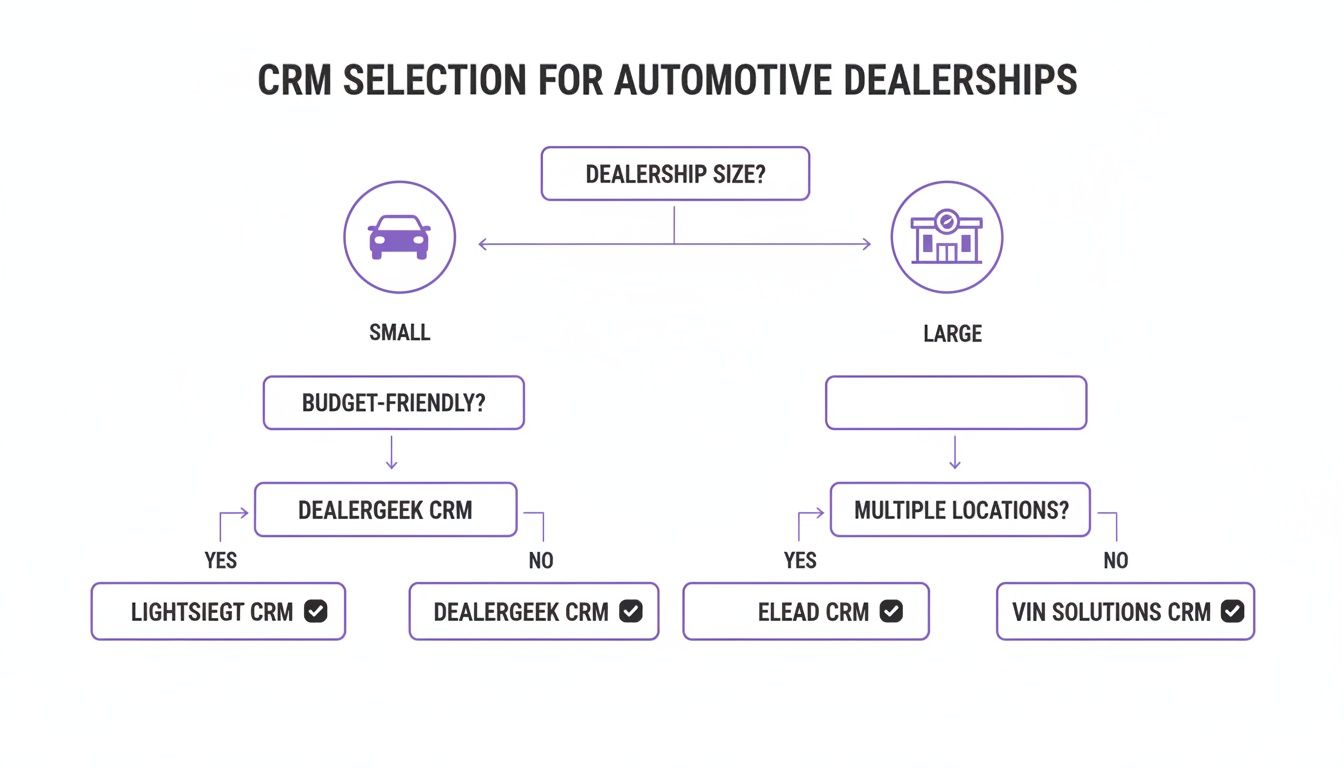
As you can see, smaller independent dealers usually need tools that prioritize simplicity and building relationships, while the big multi-lot operations demand more horsepower for enterprise-level tasks.
Lead Follow-up Automation
In this business, speed and consistency are everything. Having an automated system that can jump on a lead 24/7 is a game-changer. But not all automation is created equal.
Scenario A: The Night Owl Shopper
A customer fills out a form on a 2019 Ford F-150 at 11 PM on a Tuesday. What happens next?
DriveCentric: This is where DriveCentric really shines with its 24/7 AI-powered virtual BDC. The system would almost instantly fire off a conversational SMS response, confirming it got the inquiry and asking a smart qualifying question. Think something like, "Great choice on the F-150! Are you planning to trade in a vehicle?" That immediate, human-like touch makes the customer feel seen and stops them from clicking over to the next dealer's website.
AutoRaptor CRM: Built from the ground up for independent dealers, AutoRaptor’s 24/7 AI Sales Assistant is also incredibly strong. Its advantage is its natural language processing—it just feels human. The system would send an instant text or email, often with a slightly more personalized tone, and it's smart enough to re-engage old leads in your database who were looking at similar trucks.
VinSolutions: As part of the Cox Automotive world, VinSolutions relies on automated marketing journeys. The 11 PM lead would kick off a pre-built email or text that looks like it came from the assigned salesperson. It’s an effective first touch, but the response might not feel quite as conversational as a dedicated AI assistant.
The real difference-maker here is the quality of that first AI interaction. A system like DriveCentric or AutoRaptor that can hold a basic, convincing conversation buys your sales team precious time and makes a much better first impression than a generic confirmation message.
Inventory and DMS Integration
A CRM that doesn't talk to your inventory and Dealer Management System (DMS) in real-time is creating more problems than it solves. This connection has to be seamless.
Scenario B: The Mid-Conversation Stock Check
A salesperson is texting with a customer about a specific vehicle (Stock #54321). The customer asks if it has a sunroof. At that exact moment, another salesperson is closing a deal on that same car.
DealerSocket: As a comprehensive platform, DealerSocket gives you a single, unified view of what's happening. A salesperson texting inside the CRM would see the vehicle's status flip to "Sale Pending" immediately, preventing them from continuing to sell a car that's already gone.
Elead CRM: Being part of the CDK Global family gives Elead a huge leg up on DMS integration, especially if you're already a CDK dealership. Data syncs happen almost instantly. The salesperson would get an alert or see the status update right inside the customer's profile, keeping everything accurate.
Selly Automotive CRM: Designed for smaller dealers, Selly’s integrations are solid, but you might see a slight lag depending on your DMS provider. In this scenario, the salesperson could pull up the inventory data easily, but a small delay between the DMS update and the CRM could create a minor risk of quoting a vehicle that just became unavailable.
This kind of deep integration is non-negotiable. In the hyper-competitive used car market, customer retention is everything. According to Forbes Advisor, a good CRM system can increase customer retention by as much as 27%, a critical stat for independents who rely on repeat business and referrals. This is exactly why the best CRMs for dealers must work flawlessly with tools like AutoFire™'s lead capture and VIN decoder. You can read more about the research behind those retention numbers to see just how big the impact is.
Sales Team Mobile Usability
Your salespeople live on the lot, not behind a desk. A clunky mobile app is a dealbreaker—if it’s not easy to use, your team simply won't use it, and your data will be a mess.
Scenario C: The Walk-In and Trade Appraisal
A customer pulls onto the lot without an appointment. Your salesperson greets them, and they mention they have a trade-in.
AutoRaptor CRM: The mobile app makes this a breeze. The salesperson can scan the customer's driver's license to instantly create a profile. Then, they can walk over to the trade-in, scan the VIN, snap a few photos, and punch in appraisal notes right on their phone, all without leaving the customer's side.
DriveCentric: Known for its modern and clean user experience, DriveCentric’s mobile app is incredibly intuitive. Adding a new customer and their trade is designed to be fast and fluid, minimizing taps so the salesperson stays engaged with the buyer, not buried in their screen.
ProMax: While ProMax is a powerhouse for compliance and desking, its mobile UI can feel a bit dated compared to the others. Your salesperson can get the job done, but it might involve navigating through a few more menus, which can slow down the real-world interaction on the lot.
A great mobile app just gets out of the way. Scanning a VIN and driver's license is table stakes; the best platforms make this process feel effortless, which is the only way to ensure your team actually uses it consistently.
Reporting and Analytics Clarity
Data is worthless if you can't easily understand it. The best CRM for car dealers gives managers clear, actionable reports that lead to smarter decisions.
Scenario D: The Weekly Sales Meeting
A sales manager needs to review team performance, find out where deals are stalling in the pipeline, and see which lead sources are actually making money.
VinSolutions: It offers powerful, user-friendly dashboards that are easy to set up. A manager can quickly pull a report showing lead volume by source (e.g., website, Autotrader, walk-in), see conversion rates for each salesperson, and check average response times. Everything is presented in a clean, visual way that's easy to digest.
DealerSocket: This platform provides enterprise-level analytics, which is fantastic for large dealer groups. A manager can drill down into incredibly granular detail across multiple rooftops. For a single independent lot, however, the sheer number of reporting options can sometimes feel overwhelming if it isn't configured perfectly from the start.
Selly Automotive CRM: Selly’s reporting is all about simplicity and clarity, making it perfect for smaller teams. A manager can see the key metrics that matter—appointments set, demos completed, and deals closed—without getting bogged down in data they don't need. It gives you the essentials without the noise.
At the end of the day, the right choice comes down to your dealership's DNA. A tech-savvy team might fall in love with DriveCentric’s slick interface, while a relationship-driven independent dealer will see huge value in the purpose-built simplicity of AutoRaptor. Use these real-world scenarios to guide you when you're watching demos and ask specific questions about how each platform handles the daily grind on your sales floor.
Connecting Your CRM and Website to Generate More Leads
Let's be blunt: the most advanced CRM on the planet is dead weight if it isn't getting a steady diet of quality leads. Your dealership website is the primary engine for feeding it. Think of your site as your digital showroom and your most tireless salesperson, working 24/7.
The connection between your website and CRM isn't some minor IT task; it’s the central nervous system of your sales operation. A fast, well-built website doesn't just show off cars—it grabs a visitor's attention and turns that fleeting interest into solid, actionable data for your sales team. This is what transforms your site from a simple online brochure into an active lead-gen powerhouse, a critical function when you’re hunting for the best CRM for car dealers.
Turning Website Traffic into CRM Opportunities
The entire goal is a seamless, automated handoff. When a shopper lands on one of your Vehicle Detail Pages (VDPs) and fills out a form, that lead needs to hit your CRM instantly. No delays. It should be assigned to the right salesperson and flagged for immediate follow-up.
This all hinges on having a website platform built for the way dealerships actually operate. The right platform has specific features designed to pull in as many leads as possible and pipe that data cleanly into your CRM.
- Integrated Lead Capture Forms: These are much more than basic "contact us" boxes. We're talking about forms for scheduling test drives, getting pre-approved for credit, or just asking a question—and they need to be right there on every VDP.
- Mobile-First Inventory Pages: The majority of your customers start their search on a phone. If your VDPs are slow or clunky on a small screen, you're losing leads. Calls-to-action must be obvious and easy to tap.
- Built-in SEO for Vehicle Listings: A smart website platform automatically optimizes your inventory to show up in Google Vehicle Listings. This drives organic traffic from shoppers with high purchase intent straight to your cars.
The moment a shopper hits "submit" on a form, the clock is ticking. A perfect integration means that lead's data—name, email, phone, and the exact car they're looking at—is automatically mapped into the right fields in your CRM. This should instantly kick off your follow-up process without anyone having to lift a finger for data entry.
Ensuring a Flawless Integration
A broken link between your site and CRM is a sales killer. It means lost leads, frustrated customers, and a sales team staring at an empty pipeline. To get this right, you have to nail the field mapping. The "First Name" field on your web form has to talk directly to the "First Name" field in the CRM. It sounds simple, but it's where most integrations fail.
Just as important is tracking where your leads come from. Your CRM needs to know if a lead came from a Google search, a Facebook ad, or a third-party site like Cars.com. This data is gold. It’s how you calculate your marketing ROI and double down on the channels that actually bring you paying customers. You can dive deeper into this with our guide to lead generation for car dealerships.
When your website and CRM are in perfect sync, you've built a powerful, automated system. A buyer can find a specific car on Google, land on your SEO-optimized VDP, submit their info, and instantly pop up as a prioritized lead in your CRM. Your team just has to pick up the phone and close the deal.
A Practical Framework for Selecting Your Dealership CRM
Choosing a CRM is a serious investment. You're not just buying software; you're committing your team's time and shaping your dealership's future. To move from a spreadsheet of features to a confident final decision, you need a plan. This framework will help you focus on what really matters and ask the tough questions to find a true partner.
Start with an honest look in the mirror. A small independent lot selling 30 cars a month has completely different needs than a multi-rooftop group pushing 200 units. Your sales volume, team size, and current tech stack—like your DMS and website provider—are the foundational pieces that will dictate what you need.
Prioritizing Your Dealership’s Needs
It’s easy to get mesmerized by flashy features you’ll never actually use. Instead, focus on fixing your biggest operational headaches first. A great exercise is to map out your current sales process, from lead to delivery, and pinpoint where things fall apart.
For example, is your main problem that internet leads are going cold because of slow follow-up? If so, you should be hunting for a CRM with killer automation and maybe even AI-powered responses. Or are your salespeople losing deals on the lot because they can't access inventory details on their phones? Then a slick, powerful mobile app becomes non-negotiable.
The goal is to select a tool that fits your current workflow while providing the structure to improve it. Don't change your entire business to fit a piece of software; choose software that amplifies what you already do well and fixes what you don't.
This decision doesn't happen in a vacuum, either. The global market for the best CRM for car dealers is shifting. Asia Pacific is set for explosive growth at a 12.3% CAGR from 2025-2033, while North America is growing at a still-impressive 8.5%. This trend underscores why dealers everywhere need CRMs that integrate seamlessly with modern websites for things like SEO-friendly inventory and Google Vehicle Listings. You can explore the global market dynamics to get a feel for where the industry is heading.
Evaluating Pricing and Support Models
Once you have a shortlist of CRMs that meet your feature requirements, it's time to dig into the money and support. Most CRM pricing falls into one of two buckets: a per-user, per-month fee or a flat-rate package for the whole dealership. Make sure you calculate the total cost of ownership, which includes easily overlooked fees for setup, data migration, and advanced training.
Just as important is the quality of their onboarding and ongoing support. A fantastic platform with terrible support will become a very expensive source of frustration. When you're talking to vendors, ask them directly about their standard support response times and what level of training is included right out of the box.
Critical Questions for Your CRM Demo
The demo is your moment of truth. This is where you get to see if the platform can walk the walk. Don't let them drive with a generic, canned presentation; make them show you how their system handles your dealership's real-world situations.
Use this checklist to keep the conversation focused and productive:
- Integration Workflow: Show me, step-by-step, how a lead from my website lands in the CRM and gets assigned to a salesperson. In real-time.
- Mobile Functionality: Can my salesperson on the lot scan a VIN with the app, add a trade-in, and text a customer from their phone without any hiccups?
- DMS Sync: How often does the CRM sync with my DMS? Show me exactly how a closed deal is pushed from the CRM into the DMS.
- Reporting: How would I build a report to see my team's closing ratio by lead source for last month? Let's build it together right now.
- Onboarding Process: What does the data migration and team training actually look like? Who is my single point of contact during this process?
By asking specific, workflow-based questions, you’ll slice right through the sales pitch and get a genuine feel for how the CRM will actually perform day-to-day in your dealership. This methodical approach ensures you're choosing a partner that will help you grow for years to come.
Your Top Questions About Car Dealership CRMs, Answered
Let's be honest, diving into the world of automotive CRMs can feel overwhelming when you're also trying to run a dealership. You’ve got questions, and you need straight answers. We've gathered the most common concerns we hear from independent dealers to help you cut through the noise and make a decision you feel good about.
Think of choosing a CRM less like buying software and more like making a strategic investment in your dealership's future. Getting clear on the details—pricing, features, and the implementation process—is the key to finding a tool that actually helps your team, instead of just adding another login to their list.
How Much Should an Independent Dealer Expect to Pay for a CRM?
The price tag on a CRM for an independent dealership can swing pretty widely, but you can generally expect to pay somewhere between $50 to $300 per user, per month. Some companies also pitch flat-rate packages, which can offer more predictable costs as your team grows. But what's really behind those numbers?
Several factors come into play:
- User Count: How many people need access? Think salespeople, managers, and your BDC team.
- Feature Depth: The fancier the tools, the higher the price. Things like AI assistants, complex desking calculators, or built-in marketing automation will push you toward the higher end of the range.
- Integration Complexity: The more systems you need your CRM to talk to—like your specific DMS or other third-party tools—the more it can influence the cost.
Here's a pro tip: Don't just look at the monthly fee. Always ask for a full breakdown of all potential costs. This means digging into one-time setup fees, data migration charges, and any extra costs for premium support or training. This gives you the true total cost of ownership, so you don't get hit with surprise bills later.
What's the Real Difference Between a General CRM and an Automotive-Specific One?
Sure, you could try to bend a generic CRM like Salesforce or Zoho to your will, but an automotive-specific CRM is built from the ground up for the way a dealership actually operates. The main difference is what you get right out of the box. An automotive CRM arrives ready to work, pre-loaded with the tools you use every single day.
We're talking about built-in essentials like VIN decoding, direct inventory management, DMS integration, and desking tools. These aren't add-ons; they're core to the system. It understands the unique sales funnel from the first "hello" to the test drive and into F&I, all while tying every interaction back to a specific vehicle. Trying to force a generic CRM to do all this usually means a long, expensive, and frustrating custom development project. An industry-specific solution is simply more efficient from day one.
How Hard Is It to Switch to a New CRM and Get My Team on Board?
Implementing a new CRM isn't the headache it used to be. Modern, cloud-based systems are worlds away from the clunky, server-based software of the past. The whole process really hinges on the provider’s support and onboarding structure. A good partner will assign you a dedicated specialist to walk you through everything.
This person’s job is to handle the heavy lifting, like migrating your customer data and setting up the system to mirror your dealership's sales process. But the real make-or-break factor is team training. User adoption is everything. You need a provider that offers plenty of resources—live webinars, a library of video tutorials, and a support team you can actually reach. Realistically, you should plan for a two-to-four-week adjustment period before your team feels truly comfortable and proficient in the new system.
Ready to power up your dealership with a website that feeds your CRM high-quality leads? AutoFire delivers fast, mobile-first websites with built-in SEO and lead capture forms designed to convert shoppers into customers. Launch your professional site in minutes and start generating the opportunities your sales team needs to close more deals. Get started for free at AutoFire.
