 ™
™Your lot deserves more than a Facebook page
Most independent dealers either have no website, an outdated one from 2015, or pay hundreds per month for a platform built for franchise groups. Buyers search "used cars near me" on Google. If your inventory isn't there, you're losing sales to dealers who are.
AutoFire is a dealership website builder designed for independent and small dealers. You get a modern, fast website with every vehicle listed on its own SEO-optimized page, so your cars show up when buyers search. No web developer needed. No enterprise pricing.
Dealer Website Builder Features for Independent Dealers
Automotive inventory management
Add vehicles with photos, pricing, and specs. Each listing gets its own SEO-optimized page with schema markup that describes your inventory for search engines.
Car dealer lead capture and test drives
Built-in forms capture buyer inquiries and test drive requests. Get email notifications instantly so you never miss a lead.
Dealer branding and custom domains
Use your own domain name with free SSL. Customize your site with your logo, colors, and dealership branding. No "powered by" footers.
Dealership SEO and vehicle schema
Every page ships with meta tags, schema markup, Open Graph tags, and server-side rendering. Your vehicles are indexed faster and rank higher.
AI vehicle comparison pages
Generate vehicle comparison pages automatically. Help shoppers compare models side by side while driving organic traffic to your listings.
Mobile-friendly automotive website
Built on Next.js with edge deployment. The responsive experience is designed for shoppers browsing inventory on a phone, tablet, or desktop.
Fast Automotive Website Builder with Built-In SEO
Google uses page experience signals when evaluating websites. Slow dealer sites also lose shoppers, especially on mobile.
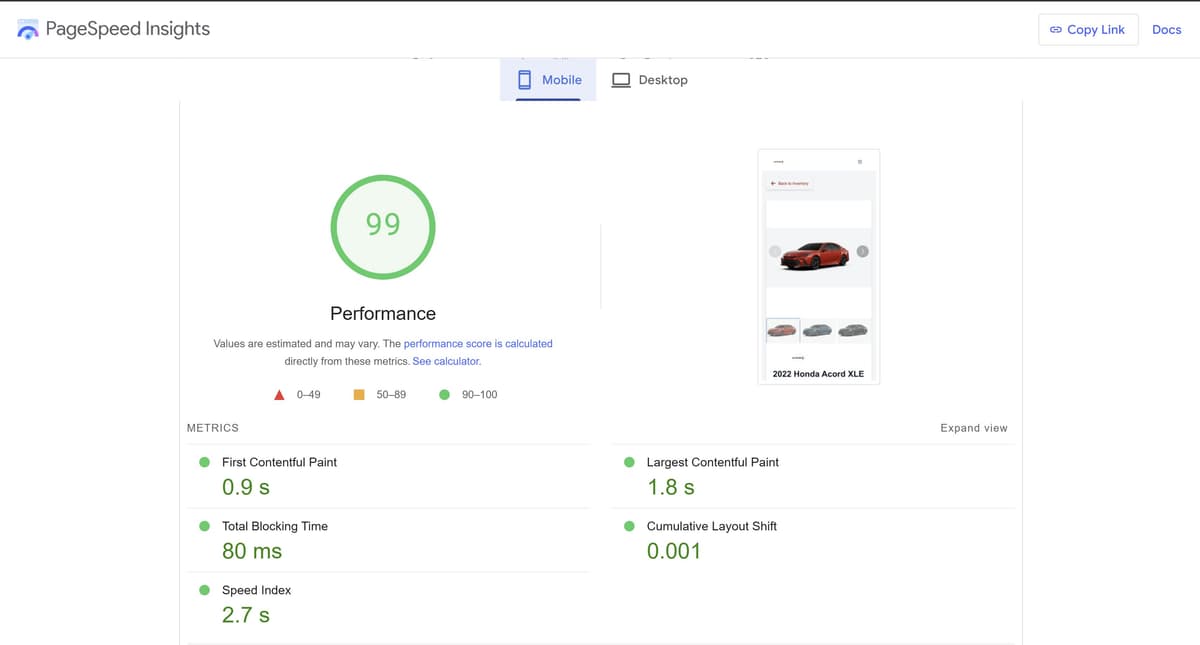
AutoFire is built on Next.js and deployed on Vercel's edge network, delivering 90+ Google PageSpeed scores out of the box. Every vehicle page includes structured data (schema markup) describing its pricing, photos, and availability. Google retired Vehicle Listing rich results.
Your inventory has crawlable pages with useful vehicle information. Indexing and rankings remain up to search engines.
Dealership Website Builder Examples and Live Demo
A dealer website example should prove more than visual design. It should show live inventory, complete vehicle detail pages, clear contact paths, fast mobile browsing, and consistent dealership branding. Review the AutoFire dealer website demo on both a phone and desktop before choosing a platform.
Inventory accuracy
Confirm that price, mileage, photos, availability, and vehicle links match the source inventory.
Lead conversion paths
Test contact forms, phone links, test-drive requests, and the route back to a specific vehicle.
Mobile shopping experience
Open inventory filters, photo galleries, and vehicle pages on a real phone connection.
Automotive Website Builder with Inventory Management
Most website builders treat dealerships like any other small business. Wix asks you to drag boxes around. Squarespace wants you to manage vehicle inventory as blog posts. WordPress expects you to glue together plugins until something works.
AutoFire is a car website builder in the same way Shopify is an ecommerce builder. Every part of the platform assumes you're selling vehicles. Add a VIN and the inventory page, the SEO tags, the schema markup, the lead form, and the social share image generate automatically. There is no "automotive plugin" to install.
Built for vehicle inventory
Year, make, model, trim, VIN, mileage, drivetrain, and price are first-class fields. Not custom database tables you maintain by hand.
Designed for car shoppers
Photo galleries, price formatting, lead capture, test-drive booking, and monthly-payment calculators ship out of the box, not as add-ons.
How to Migrate to a New Dealership Website Platform
A dealership website migration should protect inventory accuracy, search visibility, lead routing, and dealership branding. Plan the move before changing DNS or canceling the current provider.
Prepare Inventory and Brand Assets
Export the active inventory, vehicle photos, dealership logo, contact details, hours, analytics IDs, and current domain settings. Confirm which assets can be downloaded before the old account closes.
Protect SEO During a Dealer Website Migration
Keep the primary domain, preserve important URLs where practical, redirect replaced pages, verify canonical tags, submit the new sitemap, and test every lead form before launch. Read the car dealership marketing strategies guide to reconnect the new website with campaigns and reporting.
Dealer Website Migration Checklist
- Inventory and photos exported
- Domain ownership confirmed
- Priority URLs mapped
- Analytics and conversion tags copied
- Forms and phone links tested
- Sitemap and robots rules verified
Build a Car Dealer Website in Three Steps
Sign up free
Create your account in 30 seconds. No credit card required. Pick your subdomain or connect a custom domain later.
Add your inventory
Upload vehicles with photos, pricing, and details. Each vehicle automatically gets its own optimized page.
Go live
Your dealership website is live and indexed by Google. Start getting leads from day one.
Dealer Website Builder Pricing
Free
$0/mo
10 active vehicles · 10 Fuel once
Starter
$59.99/mo
25 active vehicles · 100 Fuel per month
Pro
$99.99/mo
75 active vehicles · 300 Fuel per month
Growth
$199/mo
200 active vehicles · 800 Fuel per month
Ultra
Custom
Contract-defined capacity and AI
All paid plans include the same core features. Start with a card-free, 30-day Pro trial on approval. No automatic paid conversion or usage charges.
Compare plans and included usage →Frequently asked questions
How much does a dealership website cost?
AutoFire offers a free plan with up to 10 vehicle listings and a custom subdomain. Every paid plan adds lead capture, custom domains, CARFAX integration, and marketplace feeds, priced by inventory capacity: Starter $59.99/mo (25 active vehicles), Pro $99.99/mo (75 active vehicles), Growth $199/mo (200 active vehicles), Ultra (custom terms). No contracts or setup fees.
Can I build a dealer website without coding?
Yes. AutoFire requires zero coding. Sign up, add your dealership info and inventory, and your website is live. The platform handles design, SEO optimization, and mobile responsiveness automatically.
How long does it take to set up a dealership website?
Most dealers go live the same day they sign up. Create your account, add your dealership details, upload a few vehicles, and your site is ready. Adding a custom domain takes a few extra minutes.
Does AutoFire include inventory management?
Yes. Every AutoFire plan includes built-in inventory management. Add vehicles with photos, pricing, specs, and descriptions. Each vehicle gets its own SEO-optimized page with schema markup describing the vehicle for search engines.
Can I use my own domain name?
Yes. The free plan includes a subdomain (yourdealership.goautofire.com). Every paid plan lets you connect your own custom domain (e.g., www.yourdealership.com) with free SSL and DNS verification.
What makes AutoFire different from other dealer website builders?
AutoFire is built on a modern tech stack (Next.js + React) that delivers 90+ Google PageSpeed scores out of the box. Every vehicle page includes schema markup for better search visibility. The platform also includes AI-powered FireCompare, a card-free 30-day Pro trial, and a genuine free tier afterward.
Explore more
Ready to get your dealership online?
Launch a professional dealer website with live inventory, lead capture, and marketplace-ready feeds. Try every Pro feature for 30 days with no credit card required.