 ™
™

When you're looking for the best website builders for small business, you’ll often run into two main camps. On one side, you have the all-in-one platforms like Wix and Squarespace, loved for their simplicity. On the other, you find specialized solutions like AutoFire™, which are built for specific industries. The right tool gives you the quickest path to a professional online presence without ever touching a line of code—a must-have for capturing leads and driving sales.
Choosing Your Digital Showroom

Picking a website builder isn't just about finding a pretty design. You're choosing the foundation for your digital showroom—the central hub where customers discover your products, get to know your brand, and ultimately decide if they want to do business with you.
This choice is even more critical for small businesses with specific needs, like an independent auto dealership. For them, a website has to be a lead-generation machine that can also showcase a constantly changing inventory. It's crucial to think about how your site fits into a multi-channel marketing approach for SMBs to create a sustainable path to growth from day one.
Understanding Your Core Options
The demand for a strong online presence has caused the website builder market to explode. Think about it: a strong digital presence is no longer optional for small businesses. You can find more on these trends in market analyses like this report on website builder growth.
To make sense of it all, it helps to break down the options into four main categories:
- All-in-One Builders: Platforms like Wix and Squarespace are the jack-of-all-trades, offering design flexibility for almost any type of business.
- Industry-Specific Platforms: Tools like AutoFire are designed for a single niche (like car dealerships) and come loaded with specialized features right out of the box.
- Content Management Systems (CMS): This is WordPress's territory. It offers ultimate customization but comes with a steeper learning curve and more hands-on management.
- Online Marketplaces: These aren't really for building a primary website but act as powerful secondary channels to expand your reach.
Setting the Right Evaluation Criteria
To make a smart decision, you need a solid framework. We'll be comparing these options throughout the guide using the criteria that actually move the needle for a small business.
A great website isn't just about looking good. It must be a high-performance tool that actively finds customers, captures leads, and makes it easy for you to manage your business operations online.
We’ll zero in on these key performance areas:
- SEO Capabilities: How well does the platform set you up to rank on Google?
- Lead Capture Effectiveness: Does it give you the tools to turn visitors into paying customers?
- Mobile Performance: Is the experience fast and flawless for people on their phones?
- Inventory Management: Can it handle the unique demands of your products or services?
With these benchmarks in mind, let's get a quick overview of how the main builder types compare.
At-a-Glance Guide to Website Builder Types
To help you get your bearings, here's a quick summary of the main website builder categories, who they're for, and what they do best.
| Builder Type | Ideal For | Core Strength |
|---|---|---|
| All-in-One Builders | General small businesses, service providers, and startups. | Ease of Use: Fast setup with drag-and-drop editors. |
| Industry-Specific Platforms | Niche businesses like car dealerships or real estate agents. | Specialized Tools: Pre-built, relevant features. |
| Content Management Systems | Businesses needing deep customization and scalability. | Flexibility: Limitless control over design and function. |
| Online Marketplaces | Businesses seeking additional sales or lead channels. | Audience Reach: Access to a large, existing user base. |
This table should give you a starting point. Now, let’s dive deeper into each one to see the real-world pros and cons.
Comparing the Four Main Website Builder Options
Choosing a website builder isn't just a technical decision; it's about matching a platform's DNA to your business goals. Each of the four main paths to getting online comes with its own set of trade-offs in speed, control, and specialized tools. Let's dig into what each option really means for a small business owner who needs to see results.
H3: General-Purpose Builders: The All-in-One Solution
General-purpose builders like Wix and Squarespace are the go-to starting point for many small businesses, and for good reason. They’re built to be intuitive, with drag-and-drop editors that let anyone create a professional-looking site without touching a line of code.
Their biggest draw is their versatility. You can spin up a website for a restaurant, a consulting firm, or a local handyman using the same set of core tools. This flexibility is a lifesaver for businesses that don't fit into a tidy, predefined box.
But that "jack-of-all-trades" approach can become a handicap. While they offer e-commerce or booking features, these are often watered-down versions of what you'd find on a specialized platform. For an independent used-car dealership, for instance, managing a fluid inventory with specific data points like VINs and mileage can feel clunky or require you to tack on expensive third-party apps.
Key Differentiator: General-purpose builders give you incredible design freedom and get you launched fast. Their weakness is a lack of deep, industry-specific features, which can cause real operational headaches for niche businesses.
This space is dominated by a few major players. Wix leads the pack, with a significant portion of the market share. Squarespace also holds a respectable share. Interestingly, Squarespace tends to perform better among high-traffic websites, suggesting it's a popular choice for established businesses aiming for a polished, high-end look. You can dive deeper into these market share trends in detail.
H3: Industry-Specific Platforms: The Turnkey Specialist
Next up are industry-specific platforms, which are purpose-built for one—and only one—type of business. Think of tools like AutoFire for car dealerships or Toast for restaurants. These builders intentionally trade broad flexibility for deep, laser-focused functionality.
For a used-car dealer, this means features like automatic VIN decoding, inventory feeds that sync with major listing sites, and pre-built vehicle detail pages are ready to go from day one. You're not piecing together plugins or paying for custom development because the core business logic is already baked right in.
Because the platform already understands your operational flow, setup is incredibly fast. This turnkey approach dramatically cuts the time and technical skill needed to launch a fully functional, industry-compliant site. The big trade-off? Customization. You won’t get the same design freedom as you would with Squarespace, as the platform is optimized for a specific workflow that can be difficult or impossible to change.
Practical Scenario:
- An independent dealer needs to list 30 unique vehicles with detailed specs and photos.
- On a dealer-specific platform, they use a VIN decoder to auto-populate most of the data, saving hours of tedious manual entry.
- The inventory is automatically formatted into clean, SEO-friendly listings designed to attract car shoppers. This is a core feature, not a clunky add-on.
H3: CMS and Plugins: The Path to Total Control
The third route is using a Content Management System (CMS) like WordPress, then adding functionality with plugins. This approach gives you almost unlimited control over every pixel and function of your website, from the design to complex back-end integrations.
WordPress is open-source, which gives you access to a massive community and an ecosystem of thousands of plugins. You can build almost anything you can imagine—a simple blog, a complex e-commerce store, or a custom vehicle inventory system.
But all that power comes with a hefty dose of responsibility. With WordPress, you're on the hook for finding your own hosting, running security updates, managing plugin compatibility, and handling site backups. The learning curve is steep, and for anything complex, you'll probably need to hire a developer. This makes it a less common choice for business owners looking for the best website builders for small business who don't have a tech team on standby.
H3: Marketplaces: The Essential Secondary Channel
Finally, it’s crucial to understand the role of online marketplaces like Facebook Marketplace, eBay Motors, or industry-specific listing sites. These aren't website builders in the traditional sense; you don't get your own branded domain. Instead, you're setting up a storefront within their existing ecosystem.
Their undeniable strength is instant access to a massive, built-in audience. Listing your products or vehicles on a popular marketplace puts them in front of millions of active buyers you could never reach on your own. For many small businesses, they're a vital source of leads and sales.
Relying only on a marketplace, however, is a dangerous game. You have to play by their rules, and you’re vulnerable to their algorithm changes and fee hikes. You're essentially building your business on rented land with minimal control over your branding or the customer experience. A marketplace should be treated as a powerful secondary channel that funnels traffic back to your primary website—your digital showroom—where you own the brand and the customer relationship.
To help you visualize how these options stack up against critical business needs, here’s a quick feature comparison.
Website Builder Feature Matrix for Small Business Needs
This matrix breaks down how each builder type performs across key areas, from getting found on Google to managing day-to-day operations.
| Feature | General-Purpose Builders | Dealer-Specific Platforms | CMS + Plugins | Marketplaces |
|---|---|---|---|---|
| SEO Readiness | Good (core tools included) | Excellent (niche-optimized) | Excellent (total control) | Fair (platform-dependent) |
| Lead Capture | Good (forms, pop-ups) | Excellent (industry-specific) | Excellent (limitless options) | Limited (platform-controlled) |
| Inventory Mgmt | Basic (via apps) | Excellent (built-in) | Excellent (customizable) | Excellent (core function) |
| Setup Speed | Very Fast | Extremely Fast | Slow to Moderate | Extremely Fast |
| Tech Maintenance | None | None | High (user responsible) | None |
| Customization | High | Low | Unlimited | Very Low |
| Brand Control | Full | Full | Full | Almost None |
Ultimately, understanding these core differences will help you choose the right foundation for your business—one that not only meets your needs today but also supports your growth down the road.
Analyzing the Features That Drive Growth
When you're picking a website builder for your business, it's easy to get sidetracked by pretty templates and long feature lists. But we need to look past the surface level. The real value isn't in the flash; it's in the tools that actually find you customers, turn them into leads, and make your day-to-day life easier.
This means thinking beyond the monthly price tag. A cheap builder with weak SEO is an expensive mistake in the long run. On the other hand, a platform with solid lead capture tools can pay for itself over and over again. Let’s dig into the criteria that really move the needle.
Mastering Search Engine Visibility
Showing up on the first page of Google isn't about luck—it's about having a strong technical SEO foundation. Your website builder should handle the heavy lifting here so you can focus on your business. There are three things that are absolutely non-negotiable for getting found online today.
First, mobile-first indexing. Google now ranks your site based on its mobile version, not the desktop one. If your builder gives you a clunky, tacked-on mobile site, your search rankings will take a nosedive.
Next up are the Core Web Vitals. These are specific metrics Google uses to judge your site’s user experience, measuring how fast it loads, how quickly you can interact with it, and if things jump around on the screen. A builder that consistently produces sites with high PageSpeed scores gives you a genuine edge over the competition.
Finally, for businesses with inventory, like an independent car dealership, schema markup is a game-changer. It’s a special kind of code that helps search engines understand exactly what’s on your page, leading to rich results like vehicle listings showing up right in the search results. Our guide to choosing the right dealership website builder gets into the specifics of how this can skyrocket your inventory's visibility.
Converting Visitors into Leads
A beautiful website that doesn't generate leads is little more than a digital brochure. The tools you use to capture leads have a direct impact on your revenue. As you compare builders, think about how their features will help you learn how to increase website conversion rate and turn casual visitors into paying customers.
This is where you'll see a huge gap between basic and professional platforms.
- Built-in Forms: Pretty much every builder has a basic contact form. They work, but they often lack the customization you need to properly qualify leads.
- Deep CRM Integrations: The best builders connect directly to your Customer Relationship Management (CRM) software. When a lead comes in through your site, a contact is automatically created in your CRM, kicking off your sales process without you lifting a finger.
The difference is profound. A basic form sends an email to your inbox, which can easily get lost. A CRM integration kicks off an automated sales process, ensuring no lead falls through the cracks and providing valuable data on your marketing efforts.
Think about the entire customer journey. A simple "Contact Us" form is just one touchpoint. A more capable builder will support things like multi-step forms, appointment scheduling widgets, and finance applications, giving you multiple ways to engage a prospect.
Delivering a Flawless Mobile Experience
I really can't overstate the importance of mobile performance. A huge chunk of web traffic comes from smartphones, and a slow, poorly designed mobile site is a guaranteed way to lose business. A responsive design—one that just adapts to different screen sizes—is the bare minimum.
But a truly great mobile experience goes much deeper. It’s not just about fitting on a small screen; it's about speed and usability. Does the site load almost instantly on a 4G connection? Are the buttons big enough to tap easily? Can a customer fill out a form without having to pinch and zoom?
A slow mobile site doesn't just annoy people; it actively costs you money. Study after study shows that as page load times creep up, the chances of a visitor bailing skyrocket. For a small business, every lost visitor is a lost opportunity.
Streamlining Inventory Management
If you sell products—whether it's used cars or handmade jewelry—inventory management is a huge part of your job. The way your website builder handles this can either save you hours every week or become a constant headache. It really boils down to two approaches: manual uploads or automated feeds.
Manual Uploads
- Process: You log in to your site, create a new listing, type in the details, set the price, and upload photos for every single item.
- Best For: Businesses with a very small, static inventory that almost never changes.
- Drawback: It's incredibly time-consuming and a recipe for errors as soon as your inventory grows.
Automated Feeds
- Process: Your website automatically syncs with your inventory system (like a dealer management system or an e-commerce platform). When you add or sell something in your system, your website updates on its own.
- Best For: Any business with a dynamic inventory of more than just a handful of items.
- Benefit: This approach gets rid of double-entry, keeps everything accurate, and saves a massive amount of admin time.
Calculating the Total Cost of Ownership
Finally, you have to look beyond the sticker price. That low monthly fee is often just the beginning. To make a smart financial choice, you need to consider the total cost of ownership, which includes all the potential hidden fees.
A cheap plan looks great at first, but if you have to buy expensive third-party plugins for crucial things like SEO or lead capture, your total cost can easily blow past what you would have paid for a more comprehensive, specialized platform. Always ask what’s included out of the box and what will cost you extra down the road.
Finding the Right Fit with Real-World Scenarios
Comparing features on a spreadsheet only gets you so far. The real test is how a website builder performs in the wild, solving actual business problems. Let’s walk through three common scenarios I see all the time with small business owners.
By looking at their specific goals and challenges, you can see your own situation reflected and get a much clearer idea of which path makes sense for you. Each one represents a different stage of growth, from just starting out to needing a fully custom setup.
Scenario 1: The Start-Up on a Budget
Meet our first business owner. They’re launching a new venture and need to get online fast. The main goals are to look professional and start capturing leads, but the budget is razor-thin. They need something they can build and manage themselves, preferably over a weekend, without hiring a developer.
For this situation, a general-purpose builder like Wix or Squarespace is the perfect fit. These platforms are built for speed and simplicity. They roll hosting, security, and basic support into one predictable monthly fee, so there are no surprise bills.
- Key Advantage: Their drag-and-drop editors mean anyone can build a respectable-looking website. You can easily add contact forms, link your social media, and get your business online without touching a line of code.
- Why it Fits: It directly solves the start-up’s core problems: speed, cost, and ease of use. It’s a solid, no-fuss foundation for establishing an online presence.
Scenario 2: The Established Business Needing an Upgrade
Our second business has been operating for a few years, but their website is painfully outdated. They’re losing ground to bigger competitors and need more than just a digital brochure. Their priorities are sophisticated inventory management and powerful, niche-specific SEO to attract serious buyers. A generic site just won’t cut it anymore.
This is where an industry-specific platform like AutoFire shines. These builders are engineered from the ground up to solve the unique headaches of a specific industry. For an independent car dealer, that means getting tools like VIN decoding, automated inventory feeds, and vehicle-specific SEO features right out of the box.
An industry-specific platform isn't just a website builder; it's a business operations tool. It streamlines the most time-consuming parts of the job—like manually updating inventory—freeing up the owner to focus on sales.
This decision tree shows how you can start to prioritize features based on what matters most to you right now—whether that’s dominating search results, getting more sign-ups, or making sure your site works perfectly on mobile.
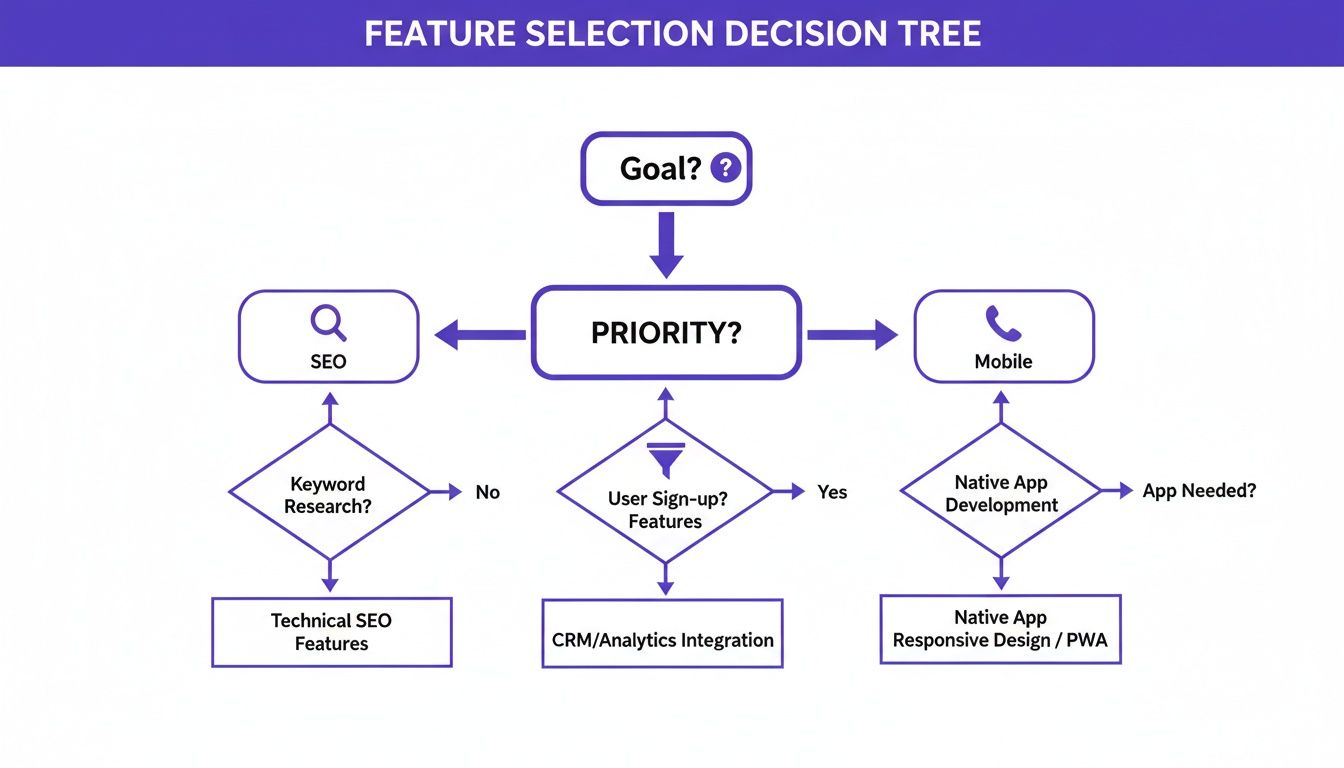
The takeaway here is that your main business goal should dictate your feature set. That’s how you find a builder that actually helps you grow.
Scenario 3: The Custom Build with Technical Resources
Finally, we have a business with the resources—and the ambition—for a completely custom solution. Money and time aren't the primary constraints. The goal is total control over every pixel and function, from a unique design to deep integrations with their in-house software. An off-the-shelf product is a non-starter.
The obvious choice here is a CMS with plugins, and that almost always means WordPress. This approach gives you limitless flexibility. With a universe of plugins and full access to the source code, there are no ceilings on design or functionality. If you can dream it, you can build it.
But all that freedom comes with a ton of responsibility. You're on the hook for managing your own hosting, security, updates, and backups, which usually requires an in-house expert or a budget for developers. If you sell specialized products, learning more about how a custom automotive website builder can balance this control with convenience is a smart move.
By matching your own business to one of these profiles, you can cut through the noise and choose a platform that won’t just work for you today but will also grow with you tomorrow.
A Practical Checklist for Switching Platforms

Picking a new website builder is just the first domino. The real challenge is the migration itself—moving everything over without torpedoing your traffic, losing leads, or angering Google.
I’ve broken the whole process down into three straightforward phases. Think of it as a roadmap to get you from your old site to your new one with minimal headaches. A solid plan turns what feels like a monumental task into a series of clear, manageable steps.
Phase 1: Pre-Launch Preparations
Before you even log into your new builder, you need to lock down everything on your current site. This phase is all about auditing what you have and making copies so nothing gets lost in the shuffle. Getting this right is the foundation for a smooth move.
First things first: create a complete backup of your website. This is your non-negotiable safety net. After that, it’s time to export all your crucial data.
- Inventory Data: If you're running a dealership, pull a full export of your vehicle listings—every photo, spec, and description.
- Content Audit: Fire up a spreadsheet and list every single page and blog post. Make columns for their URLs, titles, and meta descriptions. You'll need this later.
- Customer Information: Securely download any lead data or customer lists from your forms or CRM.
This initial legwork means you have all the pieces ready to go when you start building on the new platform. No more frantic searching for a missing file right before launch.
Phase 2: New Platform Setup
With your assets safely backed up, you can start building your new digital storefront. This is where you’ll configure the site, import your data, and get all the gears turning before you flip the switch.
Your first decision is the design. When you look through the options, think about which one truly reflects your brand and, more importantly, makes your products look great. For a niche business, browsing a gallery of used car dealer website templates can give you a huge head start.
Next, you'll import your data and set up your core business functions:
- Upload Content and Media: Start rebuilding your key pages and uploading all your product photos and other media.
- Configure Inventory Feeds: Connect your inventory management system, whether you’re doing it manually or hooking up an automated feed.
- Integrate Lead Capture Tools: Get your contact forms, appointment schedulers, and CRM hooked up and talking to each other.
- Review and Test Everything: Click every link. Fill out every form. Test the site on your phone, your tablet, and your desktop. Make sure it all works.
Phase 3: Post-Launch SEO Protection
Okay, the new site is live. You're not done yet. This last phase is arguably the most critical—it's all about protecting the search engine authority you’ve spent years building. Skipping these steps is a recipe for a traffic nosedive.
Your absolute top priority after launch is telling search engines where your old pages went. Forgetting to set up redirects is one of the most common—and damaging—migration mistakes I see.
As soon as the site is live, implement 301 redirects. Using the spreadsheet from your content audit, you need to map every old URL to its new home. This tells Google the page has moved for good, and it passes most of the old page's ranking power to the new one.
Finally, log into Google Search Console, submit your new sitemap, and keep a close eye on your analytics. Watch for any crawl errors or sudden traffic drops. Staying on top of this ensures the transition is seamless for both your customers and the search engines that send them to you.
Answering Your Key Questions
Alright, after laying out all the options, you're probably wrestling with a few practical questions. Let's tackle the big ones I hear most often from business owners so you can make a final call with confidence.
How Much Does a Small Business Website Typically Cost?
This is the big one, and the honest answer is: it's all over the map. The sticker price is rarely the full story. You really have to think about the total cost over time.
For instance, a DIY builder like Wix or Squarespace will land you somewhere in the $20 to $50 per month range for a decent business plan. An industry-specific platform might dangle a free starting plan, but you'll likely scale up to $50 to over $100 monthly as you start adding the features you actually need.
A custom WordPress site is a whole different beast. You're looking at thousands of dollars upfront for the initial build, plus you’ll have ongoing monthly bills for hosting, security, and maintenance.
Do I Need Coding Skills to Build a Professional Site?
Absolutely not. If there’s one game-changer in web tech, it’s the rise of no-code platforms. The best website builders today are built from the ground up for people who aren't developers.
They give you intuitive drag-and-drop editors and walk you through the setup, making it genuinely possible for anyone to create a site that looks polished and professional. While a system like WordPress is incredibly powerful, its learning curve is steep. You'll almost certainly need technical help for any serious customization or even just routine upkeep.
The new standard is a platform that puts the business owner back in the driver's seat. You shouldn't need to call a developer just to run your day-to-day business online.
How Critical Is Mobile Performance for My Website?
It’s everything. Mobile performance isn't a "nice-to-have" feature anymore; it's essential for survival. A huge chunk—likely the majority—of your customers will first find you and browse your site on their phone.
It goes beyond just user experience, too. Google now uses mobile-first indexing, which means the mobile version of your website is what they primarily use to understand and rank you. A slow or clunky mobile site will actively torpedo your search rankings and lose you sales. Period. Make sure any builder you choose delivers a lightning-fast, fully responsive mobile experience right out of the box.
Can I Switch Website Builders Later On?
You can, but it's a headache. Migrating a website is a complex project that you need to plan carefully. It means moving your domain, exporting all your content, and—most importantly—setting up redirects for every single page to preserve the SEO authority you’ve built.
This is exactly why picking a platform that can grow with you from the start is so critical. Look for a builder with different service tiers and advanced features you can unlock as you expand. Choosing right the first time will save you from a very painful migration process down the line.
Ready to build a website that actually drives sales, without the technical mess? AutoFire gives independent dealers a fast, SEO-focused platform designed to turn inventory into leads. You can launch your professional site in minutes.
